Area animations · The process
Animations are upscaled
without distorting their motion.
An animation is more than one good-looking image. Its rhythm, transparency and exact place in the scenery must survive, while the flaws exposed by the upscale are corrected.
- 246area-animation BAMs inventoried
- ×4frame upscale
- 30 fpswhen the cycle allows it
A cycle’s journey
The processed cycle keeps
its original duration.
The game’s geometry and timing remain the reference. The pipeline improves the image around that structure without moving the animation.
- 01
Extract
Separate cycles, frames, RGB and alpha.
- 02
Upscale
Process every image at ×4.
- 03
Interpolate
Add the useful in-between images.
- 04
Correct
Repair edges, joins and masks.
- 05
Rebuild
Preserve centres, order and duration.
- 06
Review
Check every animation in its area.
First pass · Local ComfyUI workflow
Every frame is upscaled
four times.
SeedVR 7B rebuilds detail from the game image. The workflow runs locally in ComfyUI on an RTX 5090. Frames are processed separately, then returned to their original order.

Second pass · Topaz Apollo
The cycle goes from seven to fourteen images
without changing its duration.
Topaz creates one image between two existing frames. This fountain moves from 15 to 30 fps while its cycle still lasts about 0.47 seconds.


The image and its cutout
Every animation uses
both an image and a mask.
The alpha channel tells the engine what is visible. White is opaque, black transparent, while grey preserves soft edges, spray and thin water.


Why a simple upscale is not enough
A basic upscale can also
bring the background back.
SeedVR improves the colours, but cannot decide by itself which pixels must remain invisible. Without rebuilding alpha, the frame background returns as blocks and bands.
RGB and alpha are therefore separated. The mask is then rebuilt case by case for water, smoke, fire or hard edges.

The POD · Edge fade
A soft edge blends the animation
into the map.

After upscaling, rectangular canvas limits can become visible. A progressive 32-pixel fade at ×4 is applied around the canvas without touching the POD’s centre.

Edge study · AR0700 fountain
The mask edge must be
rebuilt cleanly.
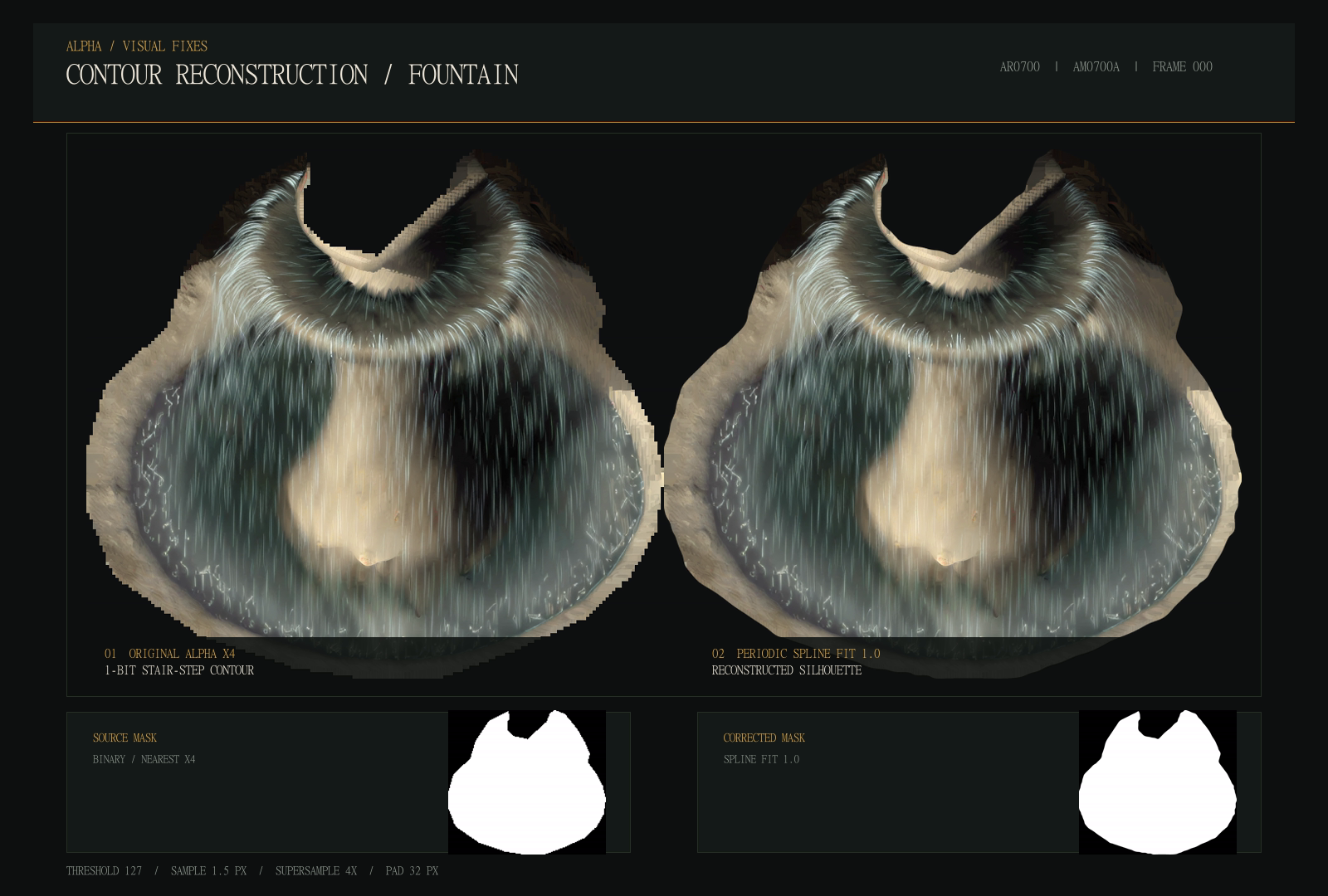
A direct upscale preserves the steps from the small original mask. Spline Fit 1 rebuilds a regular curve, then the mask is checked across every phase.


Suldanessellar · Joining two waterfalls
Both pieces are joined
into one continuous animation.
In this sub-area, the waterfall is stored in two separate resources. After they are upscaled independently with SeedVR, the pixels along their edges no longer continue in exactly the same way. The join then becomes very visible in game.


01Both images are extended into a shared 64 px area.
02The upper part fades out while the lower part fades in.
03Both edges are merged without doubling the brightness of the water.
Occlusion · Temple District
The first occlusion fix
remains too pixelated.
The scenery no longer hid the sphere correctly. Occlusion was first restored from the original outline, but its ×1 edge became far too jagged. I therefore redrew a clean mask by hand.

Alpha cuts out the animation itself. Occlusion decides which scenery parts appear in front of it.


No universal recipe
Every animation needs
its own correction.
The tools run in batches, but the decisions remain visual. Water, smoke, fire or machinery: their flaws and corrections are never quite the same.
Remove seams and keep a steady flow.
Preserve mask greys without creating halos.
Keep the energy without thickening the flame.
Adapt the mask to each position on the map.
Claude and Codex helped me build the extraction, upscale, interpolation and control tools. I still review every result myself, animation by animation and in game.
The intended result
The final motion stays smooth,
detailed and correctly placed.
The original motion stays recognisable. Most of the work removes what high resolution exposes: steps, halos, seams and incorrect masks.